
Database Mirroring Network Compression: What SQL Server Documents and How to Verify It

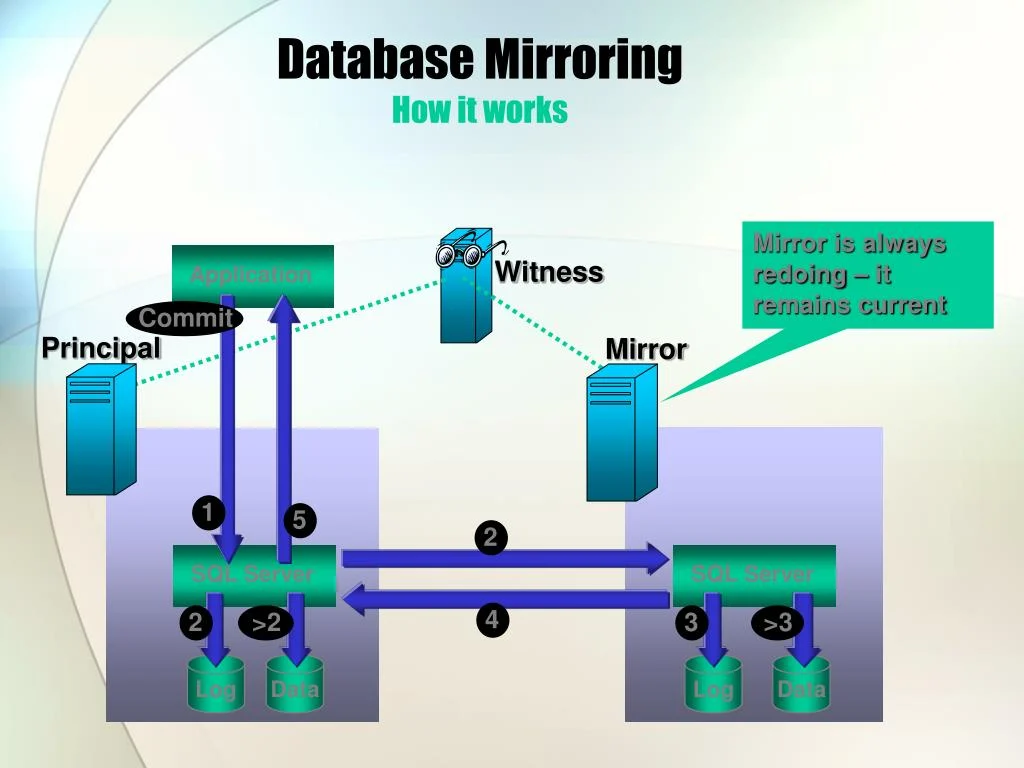
Microsoft Learn documents database mirroring as a per-database availability feature that sends transaction log records from the principal to the mirror. SQL Server 2008 and later compress that log stream automatically; there is no switch to enable or tune it. You monitor the session with sys.database_mirroring, and audit available traffic counters with sys.dm_os_performance_counters.
What the documentation says about database mirroring network compression
The Database Mirroring (SQL Server) page lists availability and data protection as benefits, describes the principal database as the read-write source whose transaction log records are applied to a read-only mirror, and separates high-safety from high-performance operation. SQL Server 2008 and later compress the transaction log stream automatically; the page does not name a COMPRESSION setting, connection flag or endpoint option. For capacity planning, that means compression is automatic and cannot be tuned from inside SQL Server; you measure the traffic the session sends.
Enabling it: what you control and what you do not
The same page shows the controls that exist. The database must use the full recovery model, the two partner instances act as principal and mirror, and the session runs in high-safety or high-performance mode. SQL Server 2008 and later compress the log stream automatically; the page shows no compression switch, no UI option and no ALTER DATABASE clause for mirroring traffic. The witness is an optional third instance in high-safety mode and carries no database data, so it has no traffic role to account for.
- Put the database in the full recovery model.
- Configure the principal and mirror instances as failover partners.
- Start the mirroring session on the principal.
- Check the session state in
sys.database_mirroring.
Once the session is in place, no separate compression configuration exists because compression is automatic from SQL Server 2008 onwards. The queries in this article were run on SQL Server 2019 CU18.
Effect on log traffic and CPU
Mirroring traffic is transaction log traffic. Microsoft Learn defines the send queue as unsent transaction log records accumulated on the principal, and the redo queue as received records waiting on the mirror. The principal sends log records, and the mirror applies them to a read-only copy.
SQL Server 2008 and later compress the transaction log stream automatically, so log traffic uses fewer network bytes than a raw stream. The principal does extra CPU work to compress each log block before sending; the amount depends on workload and is best observed rather than assumed. Sample the available log counters during a workload and compare throughput against your baseline. The mirror still redoes the same log records regardless of the transit path.
| Item | Documented role | How to observe it |
|---|---|---|
| Send queue | Unsent transaction log records accumulated on the principal | Sample log traffic counters during a workload |
| Redo queue | Received log records waiting on the mirror | Track mirroring state and redo queue |
| Witness | Optional third server in high-safety mode | No database data; exclude it from traffic checks |
| Full recovery model | Required for mirroring | Check the database recovery model |
Verifying database mirroring bytes sent with DMVs and counters
Two documented objects cover the session state and the available performance counters.
Session state with sys.database_mirroring
Query the sys.database_mirroring (Transact-SQL) catalog view to confirm the session is active.
SELECT database_id, mirroring_state_desc, mirroring_role_desc, mirroring_safety_level_desc
FROM sys.database_mirroring
WHERE database_id = DB_ID(N'YourDatabaseName');
Replace YourDatabaseName with the mirrored database name. The documented columns include mirroring_role_desc, which can return PRINCIPAL or MIRROR, and mirroring_safety_level_desc, which can return FULL for synchronous operation or OFF for asynchronous operation. It also exposes mirroring_partner_name, mirroring_connection_timeout and mirroring_redo_queue; these report session metadata, not a compression state.
Traffic counters with sys.dm_os_performance_counters
The sys.dm_os_performance_counters (Transact-SQL) DMV returns one row per maintenance counter, with object_name, counter_name, instance_name, cntr_value and cntr_type.
SELECT object_name, counter_name, instance_name, cntr_value, cntr_type
FROM sys.dm_os_performance_counters
WHERE counter_name LIKE '%Bytes Sent%'
   OR counter_name LIKE '%Log Bytes%';
If the SQL Server instance exposes mirroring or log traffic counters whose names match those patterns, they appear in the result set. Read the returned counter_name instead of assuming a fixed name, because available counters vary by build. Per-second counters are cumulative, so run the query twice, a few seconds apart, and subtract the earlier cntr_value from the later one to calculate a rate. The cntr_type values documented in the same page are 65792 for a last observed value, and 272696320 or 272696576 for average operations per second.
Reading the outputs
mirroring_state_descandmirroring_role_desctell you that the session is running; they do not report compression.- A counter row means the instance has a counter with that name; a missing row means no enabled counter matches the pattern.
- Two samples are required for per-second counters because the stored value is cumulative.
Database mirroring vs Always On availability groups
Database mirroring is supported but marked for removal in a future version; Always On availability groups are the replacement for high availability. Microsoft Learn's caution message for database mirroring says to avoid it in new development work and to modify applications that currently use it.
Microsoft Learn also warns not to confuse SQL Server database mirroring with Microsoft Fabric database mirroring. The SQL Server feature provides high availability; the Fabric feature replicates data into OneLake in Delta Parquet format for analytics.
| Aspect | Database mirroring | Always On availability groups |
|---|---|---|
| Scope | One database per session on the full recovery model | Recommended replacement for high availability |
| Recovery model | Full recovery model, as documented by Microsoft Learn | Not covered by the same page |
| Microsoft Learn guidance | Marked for removal; avoid in new development | Use for high availability instead |
Sources and version tested
Sources: Microsoft Learn pages for Database Mirroring (SQL Server), sys.database_mirroring (Transact-SQL) and sys.dm_os_performance_counters (Transact-SQL). Queries were run on SQL Server 2019 CU18.
FAQ
Can I enable or disable network compression in database mirroring?
No. SQL Server 2008 and later compress the transaction log stream automatically; there is no configuration switch.
Does database mirroring compression increase CPU?
Yes, slightly, on the principal, because each log block is compressed before being sent.
Which DMVs show mirroring network traffic?
sys.database_mirroring shows session state and role, and sys.dm_os_performance_counters lists the available traffic counters for your instance.
Is database mirroring deprecated?
It is still present, but Microsoft Learn marks it for removal in a future version and directs new development to Always On availability groups.
Does compression reduce network latency?
Compression reduces bytes on the wire, not distance-based latency; a slow WAN remains slow.
More notes