
SSIS Raw File Reader: How to Use Raw File Source and Destination

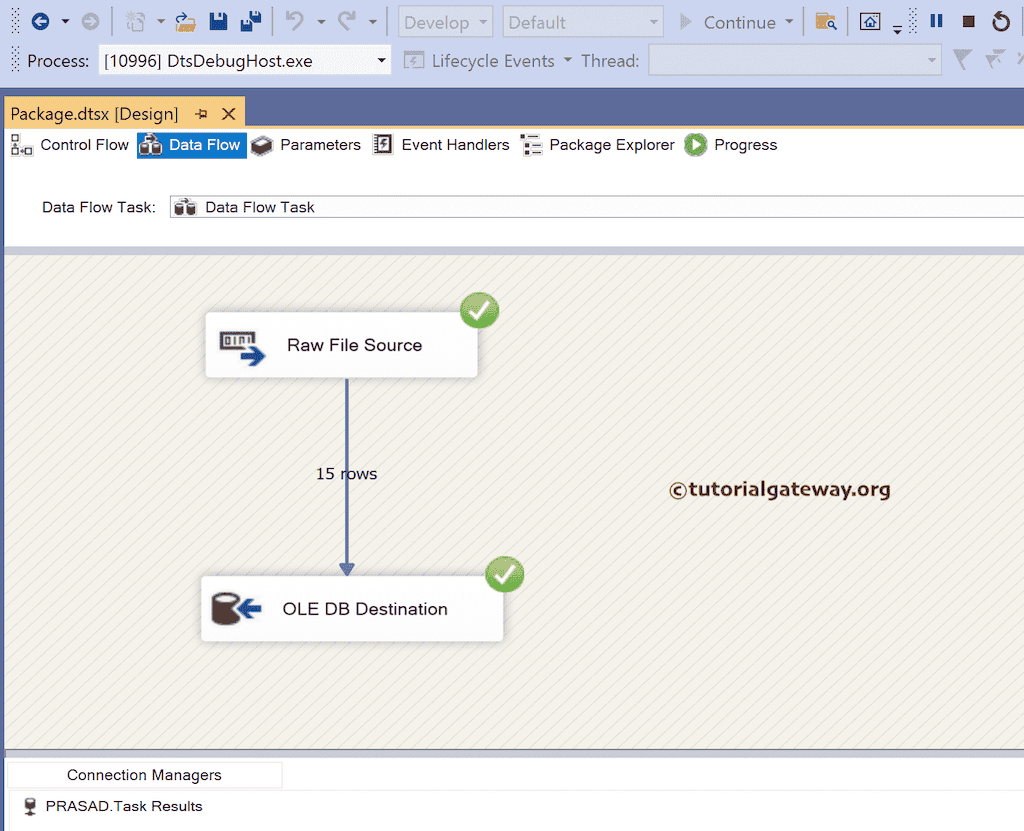
The SSIS Raw File Source reads the binary .raw format that only the Raw File Destination produces; it skips text parsing, so it is fast for staging data between package executions. You create the file with Raw File Destination, then map its columns in Raw File Source and set the file name in the editor.
When you have a .raw file in a Data Flow, the Source gives you the columns that already exist inside the file. This guide was tested on SQL Server 2019 CU18 with SQL Server Data Tools.
- What the SSIS Raw File Reader does
- SSIS Raw File vs Flat File Source: How They Compare
- Create a .raw file with the SSIS Raw File Destination
- Read the .raw file with the Raw File Source
- Raw File Source configuration and column mapping
- When to use raw files, and when not
- Common errors with raw files
- FAQ
- Sources
What the SSIS Raw File Reader does
The SSIS Raw File Source reads a binary .raw file that was written by the Raw File Destination. The file stores column values and metadata in SSIS's native format, so the Source does not parse text delimiters, encodings, or data-type conversions. Column definitions come from the file itself, not from a separate schema or connection manager. Because only the Raw File Source can read this format reliably, the .raw file is an internal staging format, not a general interchange format.
SSIS Raw File vs Flat File Source: How They Compare
The Flat File Source reads text data from delimited or fixed-position files. Raw files are binary and internal to SSIS. The table below summarises the practical differences.
| Aspect | Raw File Source | Flat File Source |
|---|---|---|
| Format | Binary .raw file written by Raw File Destination | Text file, delimited or fixed-position |
| Parsing | None; reads native SSIS binary values directly | Parses delimiters, text qualifiers, and data types |
| Performance | Fast for staging because it avoids parsing overhead | Slower for large imports because parsing costs CPU |
| Portability | Tied to SSIS; the binary layout is internal | Portable text; any ETL tool or editor can open it |
| Use case | Temporary storage between package executions on the same server | Imports from external systems, CSV, logs, and flat files |
Portability differences matter outside SSIS. A flat file can be opened and understood by another system; a raw file cannot. The speed difference depends on data volumes and data types; no fixed multiplier applies to every package.
Create a .raw file with the SSIS Raw File Destination
Add a Raw File Destination to a Data Flow Task to persist the current pipeline data.
- Open a Data Flow Task in SQL Server Data Tools.
- Drag a Raw File Destination onto the Data Flow design surface.
- Connect it to an upstream source or transformation.
- Open the editor and set
AccessModeand theRaw File Name, or the variable that holds the file path. - On the Columns page, select the columns you want to persist.
- Execute the package.
When the package runs, SSIS writes the selected column values and their metadata to the .raw file. The file is not meant to be edited or unpacked outside SSIS.
Read the .raw file with the Raw File Source
Use a Raw File Source whenever you need to bring the stored data back into a Data Flow.
- Open a Data Flow Task in SQL Server Data Tools.
- Drag a Raw File Source onto the Data Flow design surface.
- Open the editor and set the
.rawfile path, either directly inRaw File Nameor through a variable. - Review the columns on the Columns page; they come from embedded metadata in the file.
- Connect the Source output to the destination or transformation that will use the data.
- Execute the package.
You do not define a schema separately. The Source reads the column names, data types, and order from the file itself.
Raw File Source configuration and column mapping
The Raw File Source editor exposes two settings that control where the data comes from, and a column mapping page that controls what leaves the component.
AccessMode: selects a fixed file name or a package variable that supplies the file name at runtime.Raw File Name: the path to the.rawfile whenAccessModeuses a fixed file.Variable name: the package variable that holds the file path whenAccessModeuses a variable.
Changing from a fixed file name to a variable does not change the embedded column metadata. The replacement file must match the schema that was present in the original .raw file, otherwise the Data Flow fails validation before it runs.
When to use raw files, and when not
Use raw files for temporary, same-server staging between SSIS executions.
- Use them when a package writes data that another package or execution will read later on the same server.
- Use them when you want a fast binary handoff without text parsing.
- Do not use them for long-term storage; the format is internal to SSIS.
- Do not use them to exchange data with non-SSIS systems.
- Do not treat them as portable files that can be moved freely across SSIS versions without testing.
- Test raw-file packages when moving between SQL Server versions; behaviour differs before 2016 SP1.
Common errors with raw files
Raw File Source failures are usually about the file or the metadata that goes with it.
- File not found — the path set in
Raw File Namedoes not exist, or the variable is empty at runtime. - Metadata mismatch — the file was created with a different set of columns, data types, or order than the Source expects.
- File in use — another process or package execution still has the file open; close the process and retry.
Check Raw File Name and any package variable value before execution; a blank variable produces a file-not-found style error. Fix the path, recreate the file with the correct Destination mapping, or ensure the file is not locked before the package runs.
FAQ
What is an SSIS raw file?
An SSIS raw file is a binary file written by Raw File Destination and read by Raw File Source. It stores column values and metadata in SSIS's native format.
How do I read a .raw file in SSIS?
Add a Raw File Source to the Data Flow, point it to the .raw file, and run the package. The Source reads the column definitions from the file's embedded metadata.
What is the difference between raw file and flat file in SSIS?
Raw files are binary and internal to SSIS, with no text parsing. Flat files are text files with delimiters or fixed positions that require parsing.
Can I open an SSIS raw file outside Integration Services?
No. Only the Raw File Source can read an SSIS raw file reliably, according to Microsoft Learn.
How do I create a raw file in SSIS?
Add Raw File Destination to a Data Flow, select the columns to persist, set the file path, and execute the package.
Sources
- Raw File Source — Microsoft Learn
- Raw File Destination — Microsoft Learn
- Flat File Source — Microsoft Learn
More notes