
Word Hitcount Full-Text SQL: Count Occurrences

Full-text indexes tokenise text instead of storing a raw word count, so the count must come from the index metadata rather than a column. You need a populated full-text index before any hitcount query can run.
To count how many times a word appears in a SQL Server full-text indexed column, query sys.dm_fts_index_keywords_by_document, filter display_term to the word, and sum occurrence_count. For a single row, add document_id in the WHERE clause. This uses the full-text index token list and works on SQL Server 2016–2022.
The DMV query for word hitcount
Use sys.dm_fts_index_keywords_by_document to get the hitcount for a single display_term from the full-text index. The view takes a database ID and an object ID and returns one row per indexed term per document. The columns you need are display_term, document_id, and occurrence_count.
-- Table-wide total
SELECT
    display_term,
    SUM(occurrence_count) AS total_occurrences
FROM sys.dm_fts_index_keywords_by_document
    (
        DB_ID('BlogDB'),
        OBJECT_ID('dbo.Comments')
    )
WHERE display_term = N'SQL'
GROUP BY display_term;
For a single row, add document_id to the WHERE clause:
-- Per-row count
SELECT
    display_term,
    occurrence_count
FROM sys.dm_fts_index_keywords_by_document
    (
        DB_ID('BlogDB'),
        OBJECT_ID('dbo.Comments')
    )
WHERE display_term = N'SQL'
  AND document_id = 42;
Example output for the table-wide query:
display_term  total_occurrences
------------  -----------------
SQL           14
The document_id value matches the unique key column you chose when you created the full-text index. In a table with an int primary key, document_id is that primary key. If the keyword does not exist in the index, the query returns no rows; use ISNULL around the sum to return zero. The related view sys.dm_fts_index_keywords returns one row per indexed term but has no document_id, so it cannot give per-row counts. Use the by-document view whenever you need a hitcount.
Compare hitcount methods
The method you pick changes how many occurrences it can see. LIKE counts the literal string as it appears in the column, so it ignores noise words and stemming. sys.dm_fts_parser is the right tool to check how the word breaker splits a string, but it does not give a table-wide total by itself. To count word occurrences T-SQL full-text, the DMV is usually the least code when a full-text index already exists. CONTAINS and FREETEXT both rely on the same full-text token list, so the DMV count is the count those predicates will actually match.
| Method | What it counts | Tokenisation | Requires full-text index | Typical behaviour |
|---|---|---|---|---|
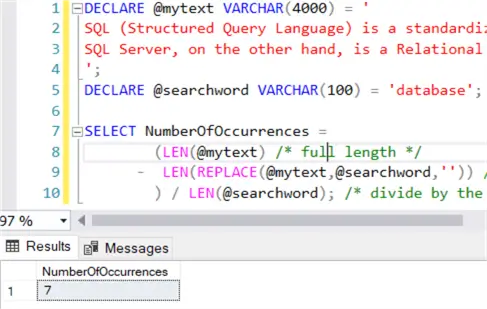
LIKE with LEN and REPLACE | literal substring matches | none | no | scans the table; case-sensitive and noise-word blind |
sys.dm_fts_parser | token rows from a sample string | word breaker applied | no | shows how the string is split; no stored count |
sys.dm_fts_index_keywords_by_document | indexed term occurrences | word breaker applied | yes, populated | reads the full-text keyword list; fastest for totals |
Use LIKE only for exact literal matches on small tables; it counts case-sensitive occurrences and does not apply the full-text word breaker. The DMV counts the indexed terms directly, so it returns the same tokens the CONTAINS predicate uses and is fastest when the index already exists. For a quick check of tokenisation, call sys.dm_fts_parser on a sample string and inspect display_term.
Choose LIKE only for small tables or one-off checks where literal precision matters. Choose sys.dm_fts_parser when no full-text index exists or when you are debugging tokenisation. Choose the DMV when the index is already populated and you need counts that match CONTAINS queries.
Compatibility and index notes
- Tested on SQL Server 2019 CU18; the same DMV query runs on SQL Server 2016 through 2022.
- Wait for the full-text index population to finish before you trust results; otherwise recent rows may be missing.
- Full-text tokenisation removes noise words and applies the word breaker for the column language, so the hitcount can be lower than a literal
LIKEcount. - If a word is missing from the result, check the index language and whether the word is in the noise word list.
No compatibility-level setting is required for the DMV itself. The important condition is that the full-text index exists and is populated. The DMV query reads from the index; it does not scan the base table. Population is the step that copies token data into the full-text index. Automatic change tracking keeps the index up to date, but after you create or alter a full-text index you can start a full population. Check FULLTEXTCATALOGPROPERTY('CommentsCatalog','PopulateStatus') before relying on the DMV. If a full population blocks other sessions, the blocked process report query can identify the blocking session. For index structure effects on storage, see page split and index internals.
Worked example: counting 'SQL' in a comments table
Start with a table that has a unique key and a full-text indexed column. This example uses dbo.Comments with a Body column.
-- 1. Create a full-text catalog if it does not exist.
CREATE FULLTEXT CATALOG CommentsCatalog AS DEFAULT;

-- 2. Create the full-text index on the Body column.
CREATE FULLTEXT INDEX ON dbo.Comments (Body)
    KEY INDEX PK_Comments
    ON CommentsCatalog
    WITH CHANGE_TRACKING AUTO;

-- 3. Run a full population if you need results immediately.
ALTER FULLTEXT INDEX ON dbo.Comments START FULL POPULATION;
Then sum the hits per document:
SELECT
    kbd.document_id,
    kbd.display_term,
    SUM(kbd.occurrence_count) AS hitcount
FROM sys.dm_fts_index_keywords_by_document
    (
        DB_ID('BlogDB'),
        OBJECT_ID('dbo.Comments')
    ) AS kbd
WHERE kbd.display_term = N'SQL'
GROUP BY kbd.document_id, kbd.display_term;
Example output:
document_id  display_term  hitcount
-----------  ------------  --------
1            SQL           2
2            SQL           5
Row 1 contains two indexed occurrences of "SQL" and row 2 contains five. To restrict the count to row 2, add AND kbd.document_id = 2.
For a quick look at how the word breaker splits a string, use sys.dm_fts_parser. It returns one row per token; inspect the display_term column to see why a word is missing from the indexed output. To see every indexed term in the table, query sys.dm_fts_index_keywords with the same database and object IDs. That view shows one row per term and includes column_id and keyword, but no per-document count. Use it when you want the vocabulary the full-text engine has stored.
FAQ
How do I count how many times a word appears in a full-text indexed column?
Sum occurrence_count from sys.dm_fts_index_keywords_by_document for that display_term.
sys.dm_fts_parser or sys.dm_fts_index_keywords_by_document for hitcount?
Use the DMV for a count of indexed terms; use sys.dm_fts_parser to check tokenisation or when there is no full-text index.
Does hitcount work with phrase or prefix search?
No. It counts a single display_term, not a phrase.
Why does my hitcount differ from LEN/REPLACE?
Full-text tokenisation removes noise words, stems, and case variants; LIKE is literal.
Can I get hitcount per row?
Yes. Filter document_id for the row; without it, the sum covers the whole table.
Sources
- Microsoft Learn: sys.dm_fts_index_keywords_by_document (Transact-SQL)
- Microsoft Learn: sys.dm_fts_parser (Transact-SQL)
- Microsoft Learn: CONTAINS (Transact-SQL)
Written by SET_NOCOUNT_ON.
More notes